








Every time you give a vendor access to your CRM ecosystem, you’re making a quiet trade-off. You need them to see something, but not everything. The challenge is drawing that line in a way that doesn’t create security gaps or slow your procurement down to a crawl.
When you’re working with a wide mix of vendors — raw material suppliers, logistics partners, service contractors. Each one has a different relationship with your business and corresponding data needs. So even if you use Business Central, setting up custom data access gets complicated.
When businesses fail to reach the middle ground, they either restrict access too much or remove all restrictions, neither of which is the right approach. Often, this leads to a data breach; according to a survey, about 70% of businesses have experienced breaches in the last three years.
An additional vendor-portal layer, along with your existing Business Central ecosystem, can resolve this issue. This is because role-based access control in the Business Central vendor portal provides a structured middle ground. Vendors see exactly what they need, and nothing beyond that.
What Is Role-Based Access Control and Why Does It Matter for Vendor Portals?
RBAC, at its core, is a straightforward idea. Instead of manually deciding what each vendor can or cannot see every time, you assign access based on a defined role. The role carries the permissions. The vendor inherits them.
That distinction matters more than it sounds. Manual permission management is error-prone — one overlooked checkbox, and a vendor suddenly has access to data they shouldn’t. With role-based access control in the Business Central vendor portal, the structure does the work for you.
What makes this especially important in a vendor context is that vendors are external. Unlike your internal team, they don’t operate within your governance framework by default. A portal without role-based structure is essentially an open corridor into your Business Central data — and external users should never have that kind of blanket access.
The Risk of Uncontrolled Vendor Access to Business Central
It’s worth being direct about what uncontrolled access actually looks like in practice — because the risks aren’t always dramatic. Sometimes they’re quiet, incremental, and only noticed after the damage is done.
Without proper Business Central portal-based data security in place, a vendor logging into your portal could accidentally land on another vendor’s pricing data or contract terms. That’s not a hypothetical edge case; it happens when access isn’t scoped correctly, and the fallout ranges from awkward to legally complex.
Sensitive internal purchase order details, financial terms, or procurement thresholds can end up visible to parties who have no reason to see them. Shared login credentials compound this further, because one set of credentials used by multiple people means there’s no real audit trail.
Then there’s the compliance dimension. If your industry has data governance requirements, unmanaged access to vendor portals isn’t just a security risk. It’s a liability. Regulators don’t typically accept “we assumed vendors wouldn’t look” as a defense.
How Role-Based Access Works in a Business Central Vendor Portal
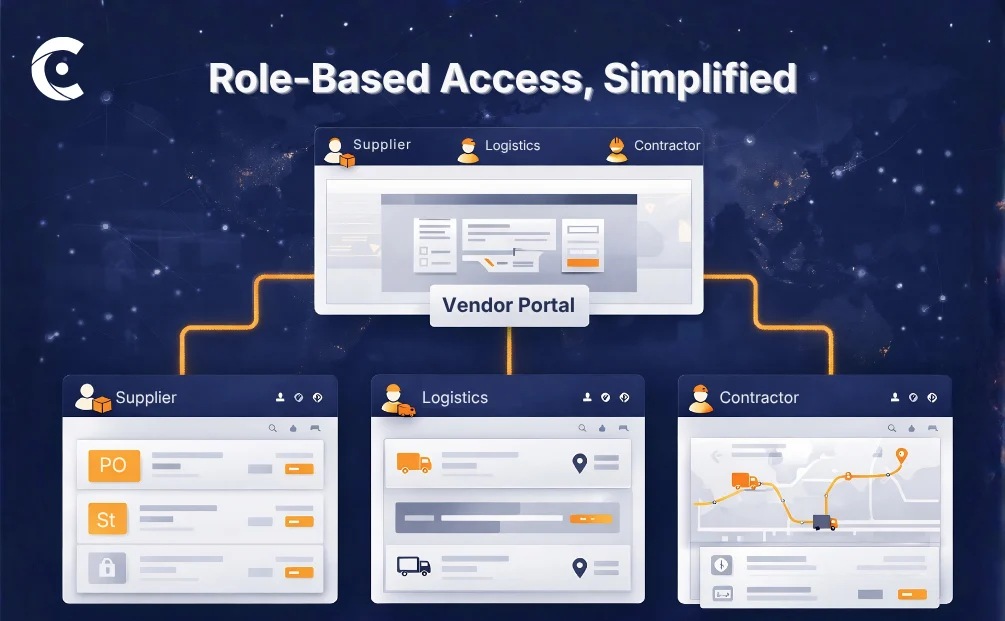
The mechanics are more practical than they might sound. When you set up role-based access control in Business Central through a vendor portal, you start by defining what roles actually exist in your vendor ecosystem.
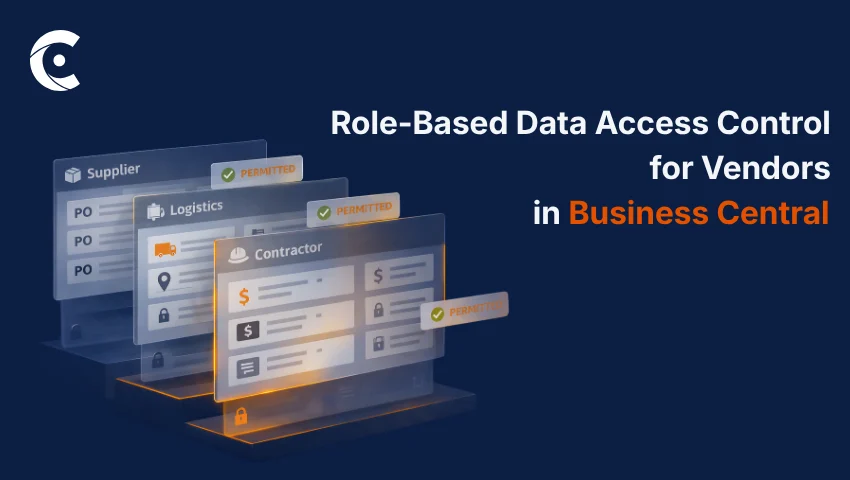
Those roles don’t have to be rigid or overly technical. You can define them by vendor type, like supplier, logistics partner, contractor. Or by relationship tier, for instance, preferred vendor, standard vendor, trial vendor. Geography and product category can factor in too, depending on how your procurement is structured.
Once roles are defined, access follows automatically. A raw material supplier, for instance, gets visibility into their own purchase orders, delivery schedules, and invoice submission — nothing more. A logistics vendor, on the other hand, sees shipment records and delivery confirmations relevant to their work. They don’t cross into each other’s data, because their roles don’t overlap.
This is exactly what a well-configured vendor portal for Business Central makes possible — role structures that mirror your actual vendor relationships, without requiring your team to manually configure access every time a new vendor is onboarded.
What Data Can Be Controlled Through Role-Based Access?
This is where secure vendor management in Business Central gets granular — and that granularity is exactly the point. You can control access at the data type level, not just at the screen or module level.
Purchase Orders can be configured so vendors are allowed to view, acknowledge, or update status — depending on what their role requires. A supplier confirming a PO doesn’t need the ability to edit it.
Invoices can be scoped to allow submission and tracking without giving vendors access to payment schedules for other accounts. Each vendor sees their own invoice history and payment status, nothing beyond it.
RFQs are particularly sensitive. With proper vendor portal access management, vendors only see and respond to the RFQs assigned to them. They have no visibility into competitive bids or procurement timelines that aren’t theirs to see.
Contracts and documents can be configured with view-only, download-only, or upload-only access depending on the vendor’s role and the stage of the relationship. A vendor finalizing a contract renewal doesn’t need access to documents from an unrelated procurement stream.
Pricing and catalogs are often where data exposure risks run highest. Role-based access ensures that pricing visibility is strictly limited to the vendor tiers it applies to. A standard vendor has no business seeing preferred-tier pricing.
Delivery and fulfillment data follow the same logic. Vendors track shipments tied to their orders — not a global view of your logistics operations. Their dashboard caters to all the particulars that are relevant to them and nothing else.
Support cases and messages stay scoped to each vendor’s own activity. A vendor portal for Business Central built on RBAC means communication threads, case history, and escalations don’t bleed across vendor accounts.
This level of control is what separates a structured portal from a shared inbox — and it’s what makes Business Central portal-powered data security a realistic operational standard rather than an aspiration.
Closing Lines
Giving your vendors portal access doesn’t mean giving up control of your data. Rather, it means being deliberate about how you structure that access from the start.
Role-based access control in Business Central ensures that every vendor, regardless of type or relationship tier, operates within a defined boundary. They see what they need. They don’t see what they don’t. And your team isn’t manually managing permissions every time a vendor relationship changes.
With real-time Business Central data, no local data storage, and role structures that reflect how your vendor ecosystem actually works, secure vendor management in Business Central becomes the operational standard, not the exception.
CRMJetty’s Business Central Vendor Portal is built around exactly this model. See how it can fit right into your business model and enhance it.