








No matter the business size or industry, there is a set of tools that businesses need these days to run their operations successfully. This generally includes a CRM, an ERP system, a project management platform, and at least one marketing automation tool. The problem, however, is managing all of them.
Each of these systems holds a piece of your business puzzle, but they don’t really connect the way they are expected to, leading to data silos, more manual efforts, and automation process failure. This is why, reliable integrations are no longer a luxury element, but a core infrastructure requirement.
Real-time data synchronization enables faster decisions, improves team operations and customer experiences, and this is the key element that multiple disconnected systems miss. CRMJetty’s latest integration capabilities aim to tackle exactly these issues. It aims to bridge the gap between your CRM and the rest of your tech stack.
What Makes Management Tougher Than Businesses Expect
Ideally, connecting two systems should be simple, but it isn’t, and many businesses find this out the hard way.
Data syncing problems are usually the first thing that surfaces. Sales is looking at one version of a customer record while the finance team is looking at another. Neither knows whose information is correct, but both act on it. This leads to chaos like incorrect invoices, duplicate outreach, or more.
Integration failures are another problem. When an automation workflow depends on a sync between platforms, it’s only as stable as the weakest point in that connection. When something drops, the workflow just stops. This leads to serious record inconsistencies that demand manual cleanup.
And if you try to add a fresh tool, a platform upgrade, a change in how a process runs, it brings its own set of challenges. Especially in the case of integrations that require extensive custom development to build and significant maintenance to keep running aren’t realistic for most businesses.
Another factor that adds to this complexity is the rigid setup. These work fine for smaller businesses and simple workflows, becoming a liability when things change. Which they always do. This is precisely the gap that stronger integration capabilities are designed to close.
What’s Changed in CRMJetty Portal Integrations
Three things got meaningfully better: data synchronization reliability, automation support, and how much flexibility you have in building and managing connections. You can implement these to connect your CRM with external applications and tools.
But the more significant changes happened on the administration side. In the past, there were certain integrations that required developers’ assistance to monitor, adjust, or troubleshoot them; this update changes that.
It will allow you to see what’s active, catch errors early, and make configuration changes without touching a line of code. That shift, from “build it and hope” to “build it and actually oversee it,” is where the real operational value shows up over time.
What CRMJetty Portal Can Now Connect To
Accounting platforms like QuickBooks, Xero, and more can connect, meaning invoices, payment records, and billing status stay current with your CRM data automatically. The weekly reconciliation sessions where someone cross-references two exports and tries to figure out which one is right? Those stop being necessary.
Project management tools like Jira, Asana, and Monday.com can be connected so that a closed deal or a new service request automatically creates or updates the corresponding project record. Delivery teams don’t have to wait for someone to remember to loop them in. The information arrives when the trigger fires, not whenever the handoff email gets sent.
Broader enterprise integrations, such as ERP systems, HR platforms, and industry-specific integrations, are also possible with CRMJetty, bringing CRM data into a wider operational context. What lives in your CRM stops being siloed information and starts influencing decisions in departments that previously had no real visibility into it.
For systems outside standard connectors, webhook-based and API-driven options let you configure more tailored connections. The integrations page covers what’s supported natively and what’s achievable through custom configuration — worth checking early when you’re mapping your current stack against what’s available.
The Updates That Change How Integrations Hold Up
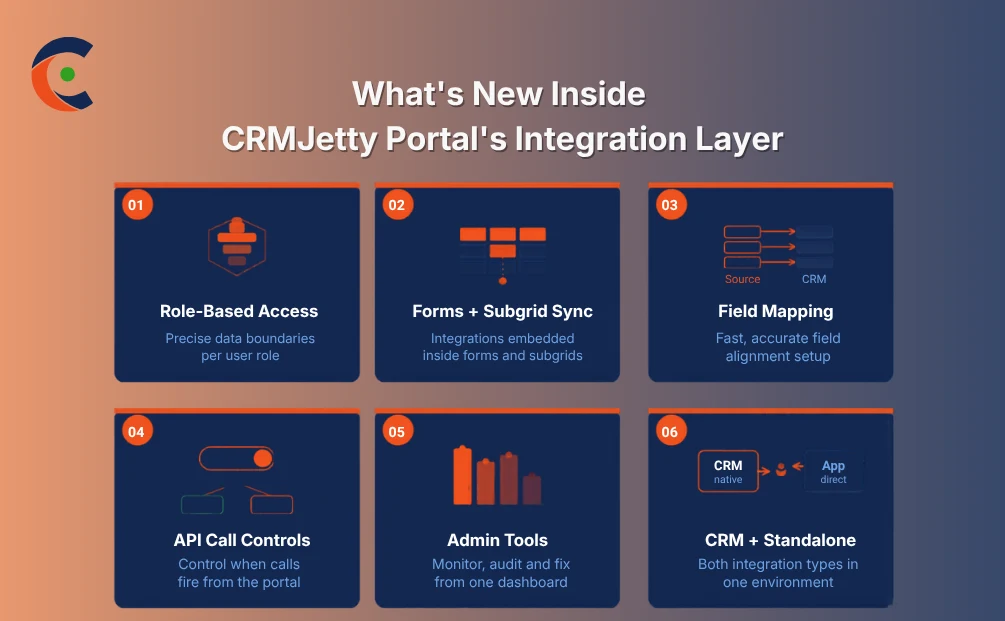
Role-based data handling sounds like a configuration detail until you actually need it. Sensitive records like financial details, medical records, or other personal data shouldn’t surface for teams they’re not relevant to. Role-based access lets you implement precise boundaries so the right data reaches the right people.
Forms and subgrid integration support expands where integrations can operate within the portal. So, you can embed integration triggers and data pulls inside portal forms and subgrids. That’s significant when the data involved spans across multiple entity structures, so your tools can be where the actual workflows happen.
Field mapping for forms and lists handles one of the most error-prone parts of any integration setup: reliably getting data from an external system into the correct CRM field. Bad field mapping slowly corrupts records. The updated interface makes configuration faster and mitigates such silent, accumulating errors.
Front-end integration call controls give you authority over when the portal triggers API requests. The default doesn’t have to be “every user interaction fires an external call”. You can implement conditions that control when calls are made, keeping performance stable and preventing external systems from being hammered with unnecessary requests.
Admin tools for managing integrations close a visibility gap that most integration setups just accept. A central interface that shows sync status, error logs, active connections, and configuration options lets your team handle what’s running. So, when something behaves unexpectedly, the information to diagnose it is right there.
CRM and standalone integrations running together remove an architectural constraint that tends to get overlooked. CRM-native and standalone integrations connect directly to third-party applications independently. They can both operate in the same portal environment. That combination gives you room to design integration architecture around your actual data flows.
What Shifts in Practice
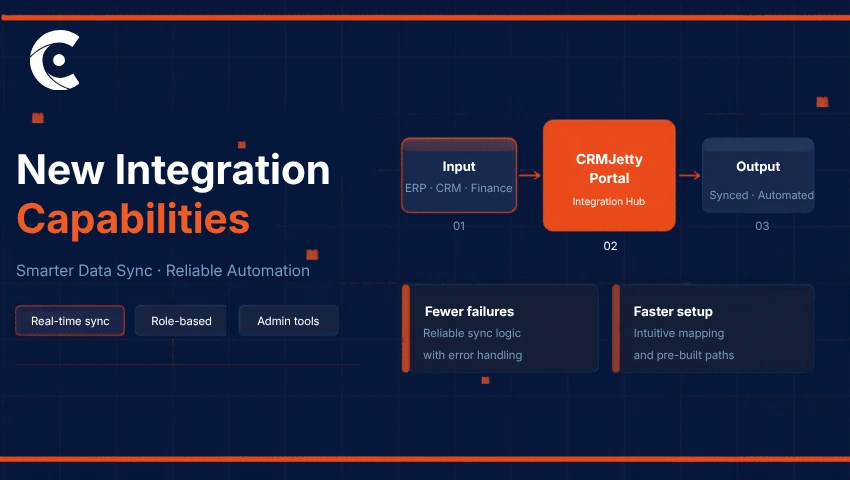
Fewer failures is the first one. When error handling is better, and admin visibility catches problems early, automation workflows don’t break, and data quality doesn’t degrade without anyone noticing.
Setup gets faster — measurably, not just in theory. Intuitive field mapping, pre-built paths for common integrations, and configuration that doesn’t require custom development for standard use cases all reduce the time between deciding to connect a system and having it actually live.
Real-time sync changes the trust level teams have in their data. Not “this was accurate when the batch ran at midnight” — accurate now, reflecting what happened when it happened. That difference shows up in the quality of decisions being made against that data.
And then there’s the control question. Having a complete understanding of trigger points, information access, and other important data creates transparency and makes integrations easier to manage. It can also simplify the process of adding a new tool or replacing old ones, as the framework handles everything.
Closing Lines
The businesses that operate cleanly aren’t the ones with the fewest tools. They’re the ones whose tools share information reliably and act on it consistently. Integrations are what make that possible — and when they’re unreliable, rigid, or opaque, the entire connected stack suffers for it in ways that are hard to attribute directly but easy to feel.
CRMJetty Portal’s updated integration layer is built for the realities businesses actually deal with: systems that need to flex, data that needs to be trusted, and integrations that need to be manageable beyond their initial setup.
Whether the immediate need is to sync financial records, bridge sales and delivery, or connect a stack that’s grown more complex over time. You can implement them to close the gaps that have been quietly costing you.
Reach out to the CRMJetty team to understand how these updates fit your environment specifically and what a more connected, reliable setup could realistically look like for your business.