








Data sitting in one system while your team scrambles across four others is an operations problem dressed up as a technology problem. You’re checking the Salesforce dashboard. Your accounting team’s in QuickBooks. Support is buried in Jira. Marketing data is spread across platforms nobody’s opened since last week.
When a customer just updated their profile in the portal, someone on your team is about to manually copy that into another tool. Again. That cycle doesn’t fix itself. The portal shows CRM data, but it doesn’t get communicated to other tools. So your team fills the gaps instead.
The real issue is that most portal solutions were never designed to reach beyond the CRM they’re built on. They connect to Salesforce or Dynamics 365 well enough, but try pushing a portal-generated invoice into Xero, or syncing a case status with ClickUp, and you hit a hard wall.
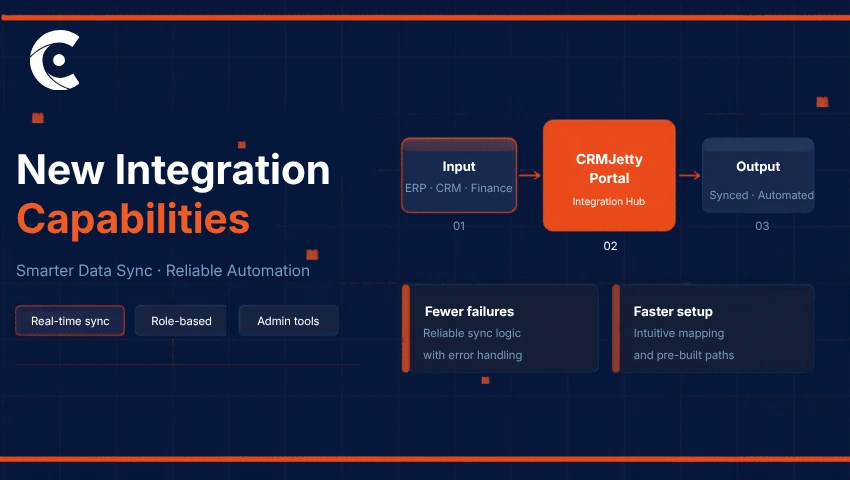
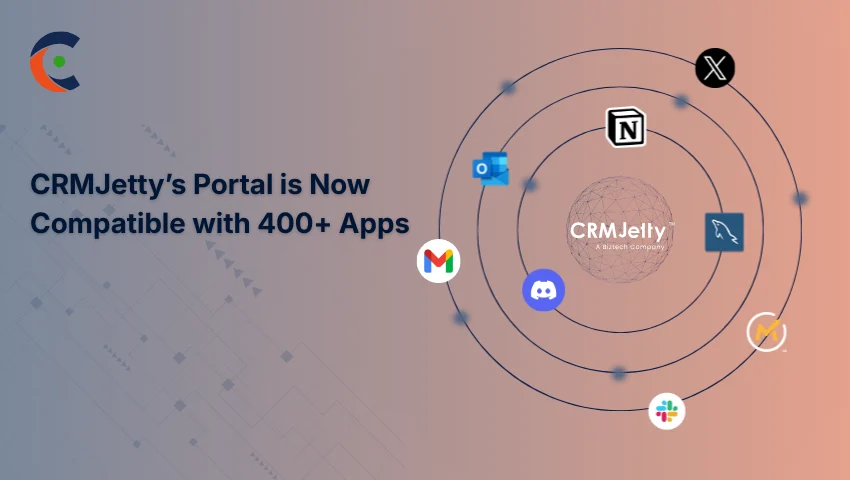
That wall is where operational efficiency stops. But CRMJetty portal integration is built to push past it, connecting your portal to 400+ apps so your team stops acting as the bridge between software.
Defining the Integrated Portal Layer
A portal is an authenticated, data-connected interface designed for specific external users, such as customers, partners, and vendors. It’s not a replacement for your CRM but a solution that can extend its capabilities.
CRMJetty portal integration sits as a low-code layer on top of Salesforce or Dynamics 365, like an extension of it, not a substitute. It takes the internal-facing data structures of your CRM and surfaces them in a format your external users can actually work with.
A truly integrated portal doesn’t just show data, it acts on it as well. A customer action in the portal shouldn’t stop at updating a CRM record. It should ripple outward into your support platform, your accounting tool, your project management stack.
You can implement workflows that start with a single portal event and end with synchronized updates across your entire tech stack. No custom code. No fragile API maintenance. No developer queue to join every time a connection needs adjusting.
What 400+ App Compatibility Actually Changes for Customer Portal Automation
The jump to 400+ app compatibility shifts the conversation. Instead of asking “can the portal connect to this tool?” you start asking “how should it connect?” That’s a meaningfully different place to be.
These aren’t workarounds or patched-together third-party hacks. Instead, native capabilities integrate the portal with tools such as Slack, SurveyMonkey, Calendly, Klaviyo, Airtable, Twilio, and more. Your portal stops being limited by what your CRM natively supports and starts operating across the full ecosystem your business actually runs on.
With Dynamics 365 portal integration, you can trigger Slack notifications and Jira task creation simultaneously immediately when a vendor uploads a contract on the portal. The data moves in real time without anyone having to watch for it, route it, or remember to forward it.
With Salesforce customer portal integration, the same logic applies: a customer action in the portal becomes the starting point for a chain of automated responses across the connected tools. That’s customer portal automation that actually delivers. Not in theory, but in the workflow your team runs tomorrow morning.
The Stale Data Problem Is Worse Than It Looks
Everyone knows that manual exports are slow. But the deeper issue is that by the time a CSV file gets downloaded from the CRM and uploaded into a marketing or accounting tool, the data is already wrong. When external processes work faster than the information reaches your system, you slowly start lagging behind.
With CRMJetty portal integration, the portal reflects live CRM data, so any action taken by an external user writes back to your source of truth immediately. And because of the expanded app connectivity, that updated data flows into your other tools at the same moment. So your support agent and the customer work on the same data.
So, when a customer raises a ticket, they will see the same status as your agent in Salesforce. If that case requires technical work, the integration automatically pushes it into Jira. Everyone involved has access to the same information without anyone manually moving it between systems. That’s the closed-loop your team has been trying to build for years.
How This Plays Out Across Salesforce and Dynamics 365
In the Salesforce world, the focus tends to be on customer experience at scale. You can implement role-based access control so different customer tiers trigger different connected workflows. A high-value customer’s portal actions might feed into a specialized Klaviyo sequence, while a standard user follows a different automated path.
The portal reflects the distinction without your team having to manage it manually. Agentforce integration also means AI agents can be embedded directly into portal widgets, pulling from real-time account data flowing through connected apps to give responses that are actually relevant, not generic.
In the Microsoft ecosystem — particularly with Business Central — the priorities lean toward ERP logic and financial accuracy. You can implement payment and invoice workflows that sync directly with QuickBooks or Xero.
So, when a vendor responds to an RFQ in the portal, that data updates your internal financial records immediately. You’re not just managing a vendor relationship, but a supply chain with automated precision baked in.
What Changes When the Silos Go
Talking about features is one thing. The operational shift is what actually matters.
Your team stops doing data entry. Full stop. When customer portal automation handles the transfer of information across 400+ connected apps, the people who were spending half their day copying records between systems are free to do something else. Something that actually requires them.
Customer trust improves too, and faster than most teams expect. Customers stop hearing “let me check the other system.” They get answers directly from the portal because it has them. That kind of responsiveness compounds into retention.
Speed of change matters as well. Because these integrations are native and low-code, connecting a new marketing tool or analytics platform doesn’t require a development sprint. You can implement a new connection and have it running in hours. And manual data transfers error goes down. Records stay clean, consistent, and audit-ready without anyone having to police them.
The Portal Has to Do More Than Show Data
The expectation has shifted. A portal that surfaces CRM data and nothing else isn’t enough anymore, not when your operations require that data to move, trigger, and act across a dozen different tools simultaneously.
You can implement a system in which your portal, CRM, and connected third-party tools operate as a single unit. That level of operational cohesion used to require a large custom-dev budget and months of build time. With CRMJetty portal integration, it’s available to any business running Salesforce or Dynamics 365 — configured, not coded.
Whether the goal is automating vendor onboarding, tightening partner deal registration, or giving customers a self-service experience that actually works, the connections are there. This is where CRMJetty stands apart — a low-code layer that turns your portal from a passive display into an active part of your business operations.
From QuickBooks and Jira to Slack and Calendly, your portal can now drive customer portal automation across the full ecosystem. All of that without the middleware, without the overhead, and without the manual work your team has been absorbing for too long.
Ready to stop managing silos? See what these connections can do for your Salesforce customer portal integration or Dynamics 365 portal integration — get in touch.