









When an appointment scheduling system relies on manual processes, it starts to break down. This happens when callbacks don’t happen, confirmations end up in spam emails, or there are no updates on doctors’ schedules.
Some might argue that they use CRMs like Salesforce to manage their internal work, but they do not consider that CRMs do not handle external processes. Till the time your CRM is connected to fragmented communication channels, internal chaos will never cease to exist.
Phone calls and shared inboxes are still how many healthcare organizations run their scheduling. That works until it doesn’t. When patient volumes start climbing, “until it doesn’t” arrives faster than expected. Patients seek convenience and a faster process in healthcare, so waiting days just to get a “slot confirmation” phone call is not going to cut it.
These incidents, in isolation, might be minor inconveniences, but they can turn into bigger issues very quickly. Eventually, you will notice your staff spending hours on tasks that a better system would have caught automatically.
But what exactly is “the better system”?
It is an additional component that can be added to the CRM ecosystem without requiring any structural changes to the infrastructure. This layer is strategically placed to bridge the gap between your CRM, patients, and an optimally operational system.
CRMJetty’s Salesforce Customer Portal is one such solution. It sits on top of your existing Salesforce CRM and pulls scheduling into one connected place. Patients book through the portal. Staff manages through Salesforce. Nothing gets rebuilt from scratch — it’s an added layer over what you’ve already got.
Where the Salesforce Customer Portal Makes the Biggest Difference in Scheduling
Most scheduling failures result from many minor issues that were neglected. Like missed appointment windows, last-minute cancellations, lack of proper visibility, or more. These issues are not complex, and with the right system, can be managed very easily.
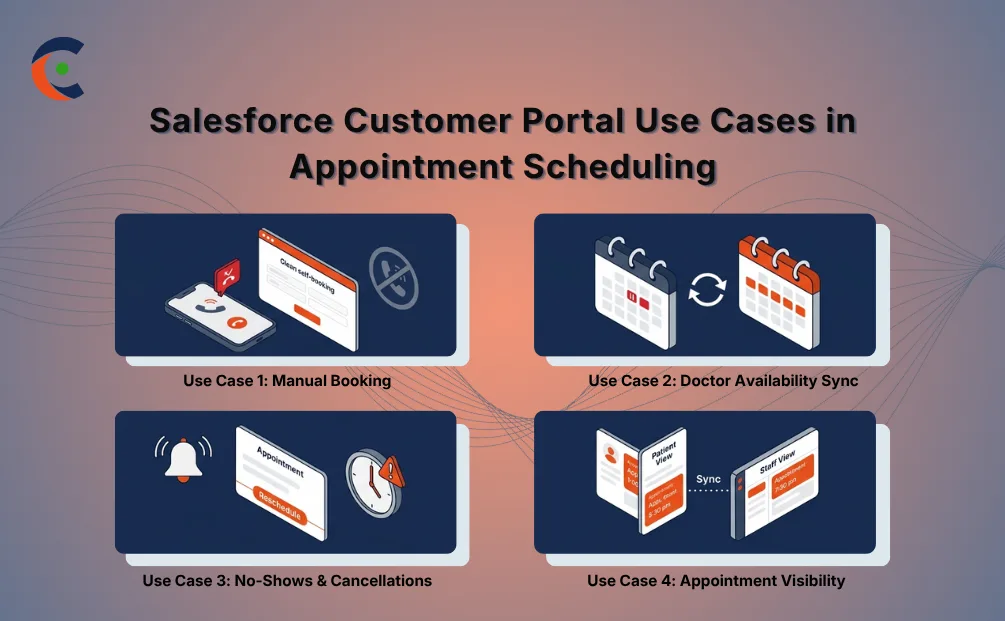
Use Case 1: Manual Booking Is Slowing Everything Down Before a Patient Even Gets an Appointment
Phone-based booking has an upper limit. The moment call volume outpaces the staff answering phones, patients start waiting for someone to pick up, a callback, or confirmation. Busy hours make it worse. A patient who calls at 11 am during a rush might not hear back until late afternoon or the following morning.
There’s no flexibility baked into the process either. Patients can’t browse available slots on their own, rather every step goes through a staff member, so every step is only as fast as that staff member’s current workload. When booking volume is high, that math catches up quickly.
With CRMJetty’s Salesforce Customer Portal, healthcare organizations can implement self-service appointment scheduling inside a patient-facing portal. Patients pull up real-time availability and pick a slot directly, no call required. The booking hits Salesforce immediately. No one has to manually enter it, no one has to chase a confirmation, and the risk of data entry errors drops considerably.
That real-time sync means no missed information, no double bookings, or lack of updates on doctors’ schedules. The portal bridges that gap. Staff get free from the time-consuming routine tasks and shift towards cases that actually need human judgment.
Use Case 2: When Doctor Availability and Patient Bookings Stop Matching Up
Scheduling conflicts happen because availability is managed across tools that don’t talk to each other well enough. A doctor blocks time in one system; the patient-facing portal doesn’t pick it up. A slot fills; it still appears open somewhere else, and a last-minute change doesn’t move fast enough through the chain.
When double-bookings happen, patients arrive for appointments that either do not exist or clash with someone else’s. Staff end up reworking schedules mid-day with no buffer. This happens when hospitals work on multiple fragmented systems that simply do not communicate.
With CRMJetty’s Salesforce Customer Portal, doctor availability syncs directly with what patients see when they go to book an appointment. Unavailable slots disappear from the patient view immediately. Staff start working from the same data, so coordination stops requiring constant back-and-forth.
Expert tip: CRMJetty’s Salesforce customer portal doesn’t replace your CRM ecosystem. It’s an additional layer that bridges the gap between your internal Salesforce data and the scheduling experience your patients use. The CRM stays your source of truth. The portal makes that truth accessible in a controlled, role-based way.
Use Case 3: No-Shows and Last-Minute Cancellations Are Eating Into Scheduling Efficiency
Do you know that patients who used portals to book their appointments had a no-show rate of 6.2%, which is significantly lower than 7.2% for those who had to do everything manually (source). These empty appointment slots are lost revenue.
When patients forget or cancel without notice, the ripple extends beyond just one slot. Staff ends up frantically calling down a waitlist at 8 am, trying to fill a 9 am gap that opened the night before. That scramble rarely goes well. A slot that cancels with six hours’ notice usually stays empty.
CRMJetty’s Salesforce Customer Portal can implement automated appointment confirmations and reminders without adding to staff workload. Patients get timely notifications and a straightforward way to reschedule if something comes up via a self-service appointment scheduling system without the need for a phone call. The slot reopens immediately, without staff, unless absolutely necessary.
A question worth asking is whether a reminder actually moves the needle on no-shows?
A reminder alone may not be, but a reminder paired with a one-click way to reschedule? That’s a different calculation entirely. When patients don’t have to navigate a phone queue just to move an appointment, they actually do it in time for the slot to be filled. That combination is what moves no-show rates.
Use Case 4: No One Has a Clear View of What’s Actually Scheduled
Fragmented visibility creates problems on both sides of the appointment. Patients aren’t sure if their booking is confirmed. Staff checks multiple systems to piece together what’s happening. Follow-up calls are made to verify things that should already be obvious. That extra communication load, on top of routine scheduling work, compounds fast.
When the information that patients and staff work from comes from different sources, you get mismatched expectations. A patient shows up believing they have a 2 pm slot, while the system says 3 pm. Nobody flagged the discrepancy because nobody had a single view of what was confirmed.
CRMJetty’s Salesforce Customer Portal gives both patients and staff a unified, real-time view of appointment details. Patients see what’s confirmed, when it is, and what’s changed. Staff work from the same information. Fewer discrepancies, fewer follow-up calls, fewer moments where the appointment reality doesn’t match what anyone expected.
That clarity also supports appointment scheduling software for doctors, enabling clinical staff to have a clean, accurate picture of the day without cross-referencing multiple tools.
Expert tip: Role-based access control is built into how the portal handles visibility. Administrators can set access rules without developer involvement. In healthcare, where data handling carries real compliance weight, that structure keeps sensitive scheduling information protected without creating access bottlenecks that slow everything down.
What This Adds Up to for Healthcare Organizations
Better scheduling doesn’t just improve one metric — it shifts how the whole operation runs.
Wait times shorten. Doctor availability is used more efficiently because slots that would otherwise be empty are filled or reassigned before the window closes. Administrative workload drops because patients handle routine requests themselves through self-service appointment scheduling, rather than routing them through staff.
On the patient side, access to care gets faster. On the staff side, the day becomes more manageable. Leadership gets cleaner data on appointment trends, which feeds into capacity planning, staffing decisions, and longer-term operational thinking.
As appointment scheduling software for doctors moves from nice-to-have to expected, organizations with a connected scheduling layer, along with their CRM ecosystem, will handle growing patient volumes without proportionally growing administrative overhead.
Conclusion
Scheduling problems don’t announce themselves dramatically. They show up as a patient who nearly missed an appointment, a doctor with two bookings in the same slot, a staff member spending 40 minutes on calls that should have taken 10. The costs are real — they just accumulate quietly.
CRMJetty’s Salesforce Customer Portal gives healthcare organizations a way to bring scheduling under control without overhauling the CRM setup they’ve already invested in. Availability syncs, bookings confirm automatically, and patients handle rescheduling on their own. Staff stop managing by phone.
You can implement a structured portal layer on top of your existing Salesforce environment and close the scheduling gaps before they compound further. Ready to see it in action?