








Looking at the current business scenario, procurement teams are likely occupied with tasks other than procurement for most of their day. They’re answering emails, forwarding copies of invoices, and explaining why a PO hasn’t moved yet.
Somewhere between the third follow-up message and the fifth status call, the actual work of managing supplier relationships quietly falls behind. The information vendors keep asking for? It’s already in Business Central. That’s the irony. Your ERP holds the answers, but getting those answers to the right people still runs through your staff.
A Business Central vendor portal is what cuts out that middle step. Vendors get secure, self-service access to their procurement data, and your team gets out of the relay business.
This blog covers what that actually looks like: what the portal does, why it matters more than most teams expect, what CRMJetty’s solution lets you implement, and where the real operational gains show up.
What Is a Business Central Vendor Portal?
It is a secure web interface that sits on top of your Dynamics 365 Business Central data and lets vendors work with it directly. No waiting on your team. No back-and-forth emails for information that’s already in the system.
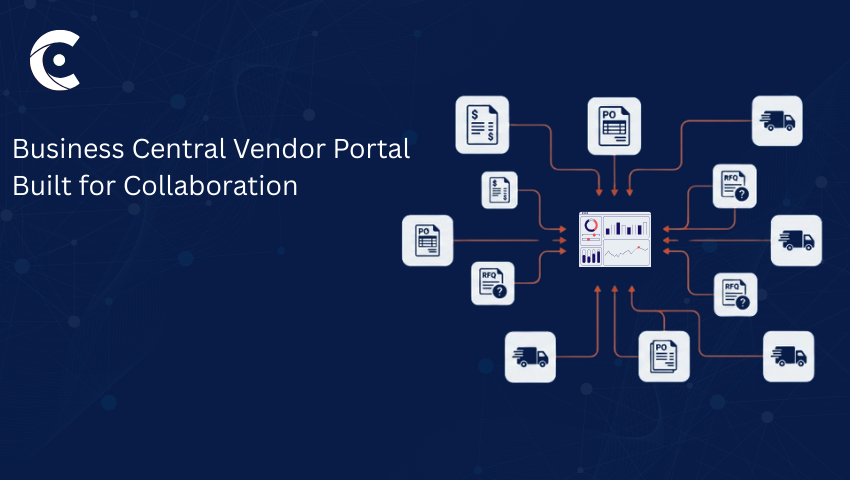
Vendors log in and handle their procurement activity themselves. From checking PO statuses to submitting invoices to responding to RFQs. It’s all there, organized around what they actually need to do.
Key Capabilities of a Vendor Portal
A well-built Business Central vendor portal isn’t a read-only window into your ERP. Vendors can do quite a bit more than just look at things. From managing purchase orders and tracking invoices to responding to RFQs and handling all the documentation, everything can be taken care of via one portal.
Other key functionalities are complete order status visibility and built-in support case. When a vendor is able to track their orders and resolve issues through the portal instead of email threads, everything stays organized and accountable.
The difference between “vendors can view their POs” and “vendors can act on them” is where the real procurement friction either dissolves or sticks around.
Why Do Companies Need a Vendor Portal for Dynamics 365 Business Central?
Email-based procurement isn’t going to snap immediately. It starts slow but eventually handling all the data gets messier and harder to manage. The team is constantly firefighting against the age-old system instead of getting the actual job done.
You know how this goes. A vendor emails asking for an invoice copy that was sent two weeks ago. Another one needs a PO confirmation before they’ll release a shipment. Your AP team is manually chasing document submissions because vendors don’t know where else to send them.
None of these things feels catastrophic on its own. Together, they quietly consume hours that should be going somewhere else. A vendor portal for Dynamics 365 Business Central addresses the root issue, not the symptoms.
Vendors get real-time access to their own data from Business Central and the tools to act on it themselves. Fewer status calls. Faster invoice cycles. Less reconciliation headache on your end. It’s not a dramatic transformation but more like permanently removing a source of friction that you’d stopped noticing.
Introducing CRMJetty’s Business Central Vendor Portal
CRMJetty built this specifically for Dynamics 365 Business Central — not a generic portal product adapted to fit. The workflows it supports are vendor workflows: purchase orders, invoices, RFQs, compliance documents, and delivery tracking. Here’s what you can implement with it.
Native Integration with Dynamics 365 Business Central
The portal connects to Business Central through secure APIs. Real-time sync so when a vendor checks a delivery status or submits an invoice, they’re working with live data, not a snapshot from a scheduled refresh.
CRMJetty is also clear that the portal doesn’t maintain its own data store. Everything vendors see is fetched directly from Business Central. For teams with data governance requirements, that’s a meaningful architectural distinction.
Vendor Self-Service Made Easy
The vendor portal for Dynamics 365 Business Central by CRMJetty is built on the idea that vendors should be able to handle their own procurement without assistance from your team.
Invoice submissions, RFQ responses, document uploads, and delivery tracking — it’s all accessible through the portal, organized around personalized dashboards that don’t require a training session to navigate. Vendors work at their own pace. Your team stops being a human search function.
Secure, Role-Based Access Control
This is the most crucial part of the portal and must be handled before anything goes live. CRMJetty’s portal handles this through detailed role-based access controls. Each vendor sees only their own records — their POs, their invoices, their documents. Nothing else.
You can also assign different roles within a single vendor organization: a finance contact sees invoices, a logistics coordinator sees delivery statuses, and an account admin manages the overall setup. The boundaries stay clean regardless of account complexity.
No-Code Setup & Customization
Your admin team can get the portal configured and running without a developer involved. CRMJetty’s Dynamic Page Builder and Advanced Data Widgets handle page creation, dashboard layouts, and branding entirely through the admin panel.
Standard rollout follows five steps — connect to Business Central, set up the portal environment, apply branding, build pages, and go live. For teams that want tighter design control, custom CSS and JavaScript are available when the no-code tools aren’t enough.
Centralized Document and Communication Hub
Compliance files, contracts, vendor documents — these have a way of spreading across email inboxes and shared drives until no one is sure which version is current. The Business Central vendor portal gives them a proper home.
Vendors upload and download documents directly through the portal, tied to the relevant records in Business Central. Support cases handle communication in the same space, so nothing gets lost in an inbox and nothing needs to be reconstructed later.
Benefits of Using CRMJetty’s Vendor Portal for Dynamics 365 Business Central
The shifts that show up after implementation are practical ones. Status request emails drop off. Invoice turnaround tightens up. AP staff spend less time chasing document submissions. Procurement decisions get made faster because the data behind them is accessible in real time rather than locked behind someone’s availability.
And because everything runs through Business Central, the data stays consistent. No duplicate entries from manual re-keying. No version mismatches between what your team has and what the vendor submitted.
Who Should Use a Business Central Vendor Portal?
Companies managing large or growing vendor bases, processing high volumes of purchase orders and invoices, or operating in industries where RFQ cycles and compliance documentation are routine, will find this portal really useful. It also handles multi-brand or multi-region setups well, where different vendor segments need separate permission structures and tailored views.
FAQs
Does setup require a development team?
Not for standard configurations. The Dynamic Page Builder and admin panel cover most of what you’d need without writing any code.
Does the portal hold vendor data separately from Business Central?
No — it pulls live from Business Central and doesn’t maintain its own data store.
Can different users within one vendor account have different access levels?
Yes. You can assign separate roles — finance, logistics, admin — within the same vendor organization.
Final Thoughts
Vendor communication managed through email threads and manual lookups isn’t a sustainable model as your supplier base grows — and most teams know it, even if the full cost isn’t always clear from within it.
CRMJetty’s Business Central vendor portal gives suppliers the self-service tools and two-way collaboration capabilities they need. With real-time Business Central data at its back and a tight access-control model keeping everything properly bounded, it can transform supplier collaboration. It’s a meaningful operational change and one you can implement without a drawn-out development project.
Want to see how CRMJetty’s vendor portal for Dynamics 365 Business Central can streamline your processes? Connect with the experts and experience that yourself.
All product and company names are trademarks™, registered® or copyright© trademarks of their respective holders. Use of them does not imply any affiliation with or endorsement by them.