








Invoice follow-ups are tedious. There’s really no other way to put it. Send an invoice, wait, send another email, maybe pick up the phone, and repeat the same process across dozens of accounts every month.
Meanwhile, customers aren’t thrilled about getting chased down either. Most people would rather just log in, see the number, and knock it out right there.
This raises a key question: Can you implement CRMJetty Business Central Customer Portal as a customer payment portal? The answer is yes. And the setup isn’t as complicated as you’d think.
Understanding the CRMJetty Business Central Customer Portal
What does this portal actually do?
Picture a secure website that hooks straight into your ERP system. Customers get their own login. Once inside, they’re looking at their data—invoices sitting there, account balances, documents they might need, records from past dealings.
Nothing stale. Everything is pulled from the source system immediately.
The reasoning behind it? Pretty straightforward. When somebody can grab their invoice copy at whatever odd hour works for them, that’s one fewer request landing on your desk the next morning. Transparency paired with self-service. Fewer interruptions for everyone involved.
How the Portal Works as a Customer Payment Portal
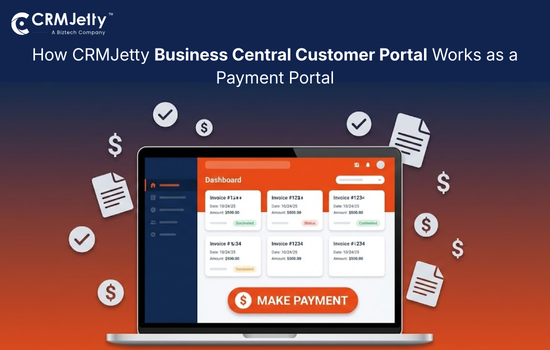
Here is the most crucial part. “Once integrated with a supported payment gateway, the CRMJetty Business Central Customer Portal can function as a customer payment portal for invoice payments. To give a walk-through from your customer’s side:
They log in. Credentials, authentication, and the usual security pieces. All the routine things.
Next, they pull up invoices. Outstanding balances show up with everything attached—amounts, due dates, line items. All laid out.
They pick what they want to pay and hit the button. Portal routes them to a secure screen. Card details go in. Confirmation happens.
After a successful payment, the updated status is synced back to Business Central based on the configured payment gateway integration. It instantly reflects the same updated situation for everyone involved in the process. Everything syncs automatically without manual intervention.
Payment Gateway Integration Flexibility
A reasonable question you might ask at this point is, what if the common payment processors aren’t what you’re working with?
The portal supports the big ones like PayPal and Stripe right out of the gate, so most of the time situation is covered.
But say you’ve got a different setup. Maybe something specific to your region. Maybe a processor you’ve built a relationship with over the years. Custom or region-specific payment gateways can also be integrated, subject to technical feasibility and configuration requirements. Not a rigid “these two options or nothing” situation.
This is genuinely helpful if you’re operating in a market that expects local payment methods or if switching processors would create more mess than it solves.
What Customers Can Do Using the Payment Portal
Once the configuration is complete, customers walk away with a pretty solid set of capabilities.
Pull up outstanding invoices whenever. They don’t have to wait for somebody to dig up a statement. Pay online in a few clicks, done. They can also check whether something went through or is still pending. Look backward through history to see what’s been settled over the past months.
Most of the invoice review and payment process can be completed by customers independently through the portal. The “hey, did my payment go through?” questions dry up because the answer sits right there on screen.
What Is Required to Enable Payment Functionality
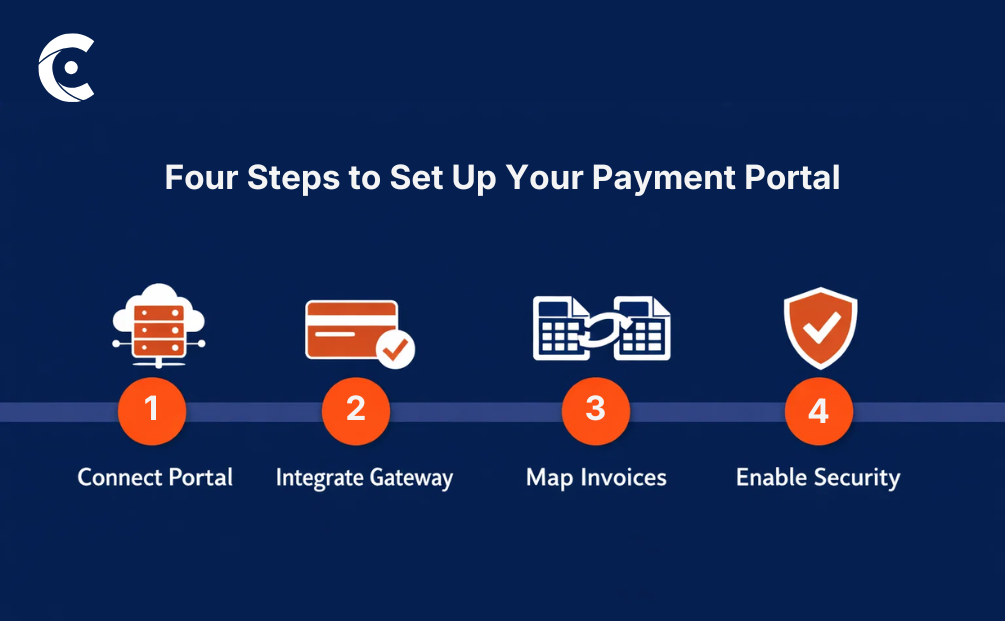
Getting this working takes a few things lining up. Not overwhelming, but not instant either.
The Business Central Customer Portal needs to be connected to your environment first. It is the foundation, and hence the most important step.
Payment gateway hookup comes next. Whichever processor you’re going with, that integration needs configuring and testing before anything goes live.
Then there’s the mapping work. Tying payments to correct invoices and accounts. Sounds obvious, maybe, but this keeps everything tidy on the backend and prevents reconciliation headaches later.
Security controls wrap it up. Role-based access means customers only ever see their own financial information. Nobody accidentally wanders into another account’s data.
Worth keeping straight: this portal extends your system outward. Doesn’t replace accounting workflows. Doesn’t swap out how transactions get handled internally. Payments continue to be processed through existing accounting workflows in Business Central, while the portal provides a secure, customer-facing interface for invoice payments.
Business Benefits
Why go through the trouble of integrating a separate portal? A few things jump out:
- Payments land faster when customers settle up the moment invoices hit their screen, instead of letting them sit
- Hours previously burned on reminder emails get freed up for actual work
- Customers notice the convenience matches what they experience everywhere else these days
- Both sides gain visibility into payment status, which kills the endless confirmation requests
- Administrative overhead shrinks when manual steps get pulled out of the equation
Nothing groundbreaking on its own. Stacked together, though, the operational difference adds up.
Conclusion
CRMJetty Business Central Customer Portal functions as a customer payment portal once you implement gateway integration. Customers get a secure place to review invoices, handle payments, and track status without reaching out through other channels.
Configuration takes some effort upfront. Nothing unreasonable. Once it’s running, though, the portal carries daily weight while your team turns attention toward work that genuinely needs human judgment.
Already running the ERP system and sick of the invoice chase? This offers a realistic path forward. No tearing out what exists—just extending it with a layer that faces customers and actually delivers value.
All product and company names are trademarks™, registered® or copyright© trademarks of their respective holders. Use of them does not imply any affiliation with or endorsement by them.