








Your Dynamics 365 CRM streamlines everything for your team, sure. They know where everything is, cases get tracked, the pipeline is moving, and everybody gets role-based visibility. Internally, everything is working optimally.
But your customers don’t live inside your CRM. They’re on the outside, sending emails to request invoices and calling in for order updates. Often, your customers end up waiting for two days for a document that took your team three minutes to find.
This gap between what Dynamics 365 holds and what your customers can actually access is where Dynamics 365 customer experience quietly breaks down. The frustrating part? Every piece of information a customer needs exists inside your CRM. They just don’t have a proper way to reach it.
That’s what these five signs are really pointing to. Not five separate problems but one structural gap, showing up in five different places. Spot even two or three of them in your own setup, and a customer portal isn’t something to plan for later. It’s what’s missing right now.
What a Dynamics 365 Customer Portal Actually Does
It is like an access layer on top of your existing CRM. One question that people often have when learning about the customer portal is, “Will the portal require a complete infrastructural change?” The answer to that is no. The portal operates on the same logic you set for the CRM.
It does not replace your CRM either. So your D365 ecosystem is going nowhere, but evolving into a system with better capabilities. That’s what the portal does: it extends CRM capabilities, allowing you to improve customer experience without overloading your staff.
This means your Dynamics 365 data, including cases, invoices, orders, etc., stays exactly where it is. Your CRM still remains the single source of truth. The portal just provides controlled, role-specific access to a part of the data for customers to see.
It allows customers to log in and see their own records. And customers welcome this shift as well, as it gives them access to all the data they seek at their convenience. In fact, 44% of B2B customers prefer self-service channels as their first interaction with the brand (source).
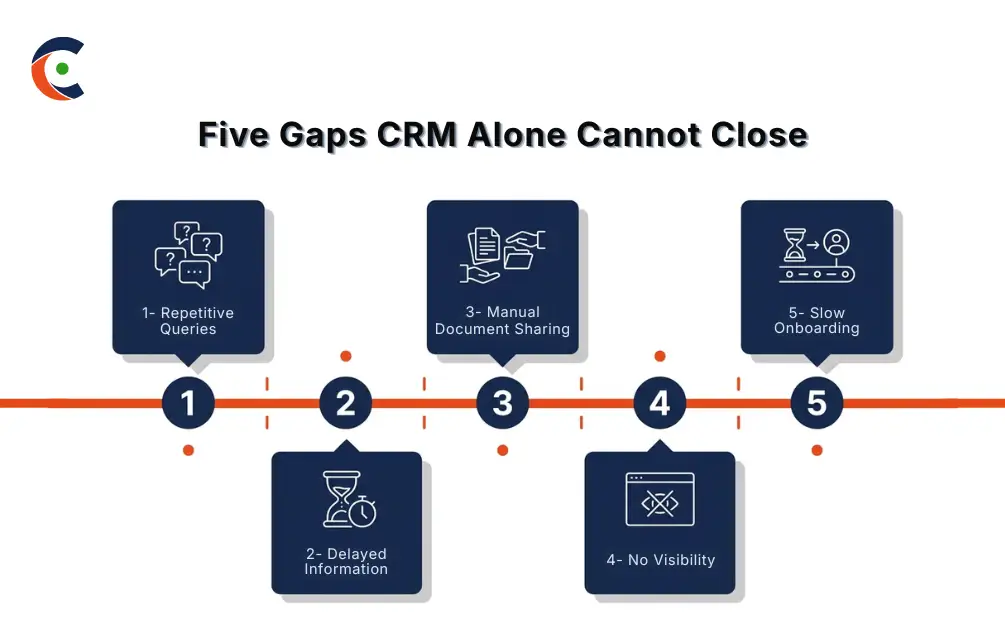
Sign 1: Your Support Team Is Flooded With Repetitive Queries
The Issue
Take a week’s worth of support tickets and just look at the patterns. It includes questions about order status, invoice resend requests, or updates. These aren’t escalations that require expertise. But they take up a large volume of tickets and occupy agent time that could be used elsewhere.
The reason is simple: Customers have no way to find these answers themselves. Your support function becomes the only path to information that customers arguably should have had from the start.
What it actually costs: Agent hours go toward information retrieval, while actual escalations sit longer in the queue. Support overhead climbs without any corresponding improvement in what customers actually experience. The customer experience erodes because of the accumulated friction nobody planned for.
Solution and Impact
Dynamics 365 support automation through a customer portal removes the middle step. Customers log in, find their own answers, and your team never enters the picture. The portal draws live data from Dynamics 365, so users access accurate information directly from the source.
Your team doesn’t shrink. Instead, they shift toward work that actually needs them. The queue reflects genuine complexity instead of volume, and response quality improves because agents aren’t splitting attention between meaningful work and routine retrieval every twenty minutes.
Sign 2: Customers Are Waiting Too Long for Basic Information
The Issue
Follow a routine customer request through your current setup. They email in or call to get some information. Someone picks it up, pulls the relevant record from Dynamics 365, writes a response, and sends it. On a good day, it takes a few hours, but sometimes, it takes longer.
The bottleneck is structural: Every request, complex or basic, travels the same internal route because no alternative exists. A customer who needs a quick confirmation has one option: wait for your team. It is not just a staff issue, but an operational one instead.
Impact: In B2B relationships, that friction matters more than it might seem. Customers are working against their own timelines and deadlines. When they consistently have to wait on your team for things they expect to access themselves, the relationship changes in small increments. The Dynamics 365 customer experience gets a negative impact because getting to the data takes longer than it should.
Solution and Impact
A Dynamics 365 Customer Portal cuts the bottleneck out at the structural level. Customers log in and see their data in real-time, without the need for any email thread, a reply from a service agent, or back and forth over something that should take thirty seconds.
They get what they need, when they need it. Your team’s involvement gets reserved for situations that genuinely call for a person. This improves the satisfaction rate, not because something complex was added, but because something unnecessary was taken out.
Sign 3: Your Team Is Manually Sharing Documents and Updates
The Issue
Think about how documents actually move between your team and your customers right now. Customer needs a quote, someone finds it, attaches it, and emails it. They need a contract from seven months ago? Someone searches, finds the right version, and sends it over. Multiply that across every active account, every week.
The root problem: There’s no customer-facing document layer connected to your CRM. Dynamics 365 document management works fine for your internal team, but customers have no equivalent access point. So every document request becomes a manual task by default. There’s no workaround in the current setup.
The risks: It doesn’t stop at wasted time. Email-based document delivery creates version confusion, meaning a customer could be working from an outdated file and neither party realizes it until something goes wrong. There’s a security concern, too, as sensitive financial or contractual documents traveling through email carry exposure that an authenticated portal access point doesn’t.
Solution and Impact
Proper Dynamics 365 document management through a portal changes the default entirely. Documents are accessible directly, so customers get the right version every time, without anyone on your team involved. Access is governed by role and permissions, so they only ever see what’s relevant to their account.
Manual document delivery drops off your team’s plate. Version integrity holds because there’s one controlled source. Authenticated portal access is considerably more secure than an email attachment chain that can be forwarded to anyone. Better outcome across time, accuracy, and security — at once.
Sign 4: You Have No Visibility Into What Customers Are Doing or Asking
The Issue
When a customer contacts your team by email or phone, often, that interaction does not end up in Dynamics 365 as a structured record. In most setups, it depends on whether someone logged it. And often, they don’t.
The key problem: Customer interactions are scattered across inboxes, call logs, and one-off conversations. Nothing systematically pulls them into your CRM. The patterns that would actually tell you something, like which documents get requested most and where customers consistently hit friction, never surface in your data in usable form.
What it leads to: Decisions about service improvement happen without the evidence that would make them reliable. You can’t act on patterns you can’t see. And right now, a significant portion of your customer activity is invisible to your reporting. The Dynamics 365 customer experience can’t improve when the feedback loop that would drive improvement doesn’t exist.
Solution and Impact
Portal-based interactions fix the visibility gap at the structural level. Every case submission, document request, and knowledge hub search becomes a data point that automatically connects back to Dynamics 365. No one has to remember to log it. It just happens.
Over time, real patterns emerge, and you get answers to questions like which questions repeat, where customers get stuck, or what they search for and can’t find. That visibility changes how you make decisions about support resources, knowledge base content, and process improvements. It takes you from guesswork to something grounded in actual behavior.
Sign 5: Onboarding New Customers Takes Too Long
The Issue
New customers need the most from your team in the shortest window. Welcome materials, required forms, access setup, onboarding guides — real coordination, all happening at once. And in most setups, every piece of it runs manually through your account or support team, repeated in full for every new account that comes in.
The gap is: Missing structure. There’s no built-in system for customer onboarding in Dynamics 365 that customers can move through on their own. Every step depends on your team initiating it, which ties the whole process directly to internal capacity. When capacity is stretched — and it always gets stretched — onboarding slows.
Both sides pay for that: Customers form their impression of your organization during onboarding. A fragmented experience shapes that impression before the actual relationship has properly started. Internally, your team runs the same sequence of steps for every new account, regardless of how repeatable the process is. That’s a ceiling on how many accounts you can onboard well at any given time.
Solution and Impact
A portal gives the structure that manual onboarding can’t. Welcome guides, required forms, checklists, and reference documents sit directly within the portal. So, customers work through the steps at their own pace, without waiting for your team to push the next piece forward.
Your team’s role shifts from executing each step to monitoring progress and stepping in where needed. The process becomes consistent across every new account. Same quality, same structure, same first impression without the same manual effort each time. Streamlined onboarding sets the tone for how customers will use self-service going forward, and that carries the image further than most people account for.
What These Signs Have in Common
Look at these five signs individually, and they seem like separate problems. Support volume. Document workflow. Slow onboarding. Invisible customer activity. Frustrated customers are waiting for basic information. But if you look at the bigger picture, everything comes back to one fundamental issue: a lack of direct, structured access to data for customers.
Dynamics 365 already holds everything it needs to — cases, invoices, orders, contracts, and onboarding materials. The information is there. What’s missing is the layer that puts it in front of the people it belongs to. Every sign on this list has the same gap, but it shows up differently. Which means one structural addition closes all five at once.
What to Look for in a Dynamics 365 Customer Portal
Not every portal solution is built the same way. When evaluating options, here’s what to hold firm on:
- Real-time data sync — the portal should reflect live CRM data without scheduled imports or manual refresh.
- No-code configuration — your team should be able to manage layouts, permissions, and content without needing a developer for every change.
- Role-based access, Dynamics 365 compatibility — different customer types need different views; access should be configurable by role.
- Dynamics 365 document management capability — customers should access, download, and submit documents directly, with version control maintained.
- Case and ticket management — customers should raise, track, and update support cases without routing through your team each time.
- Dynamics 365 supports automation features — knowledge hub, automated case routing, and self-service resolution tools that cut support volume structurally.
- Mobile accessibility — customers work across devices; the portal needs to function wherever they are.
- Security certifications and role-based access, Dynamics 365 controls — authenticated access and proper data boundaries are baseline requirements, not optional.
CRMJetty’s Dynamics 365 Customer Portal covers all of these — real-time sync, no-code admin tools, configurable role-based access, document management, and case handling — and is built as an extension layer directly on top of your existing Dynamics 365 environment.
Conclusion
Spot two or three of these signs in your own setup? Then it is time to upgrade your system, not because your CRM ecosystem is not able to keep up, but because that’s not what it was supposed to be. Dynamics 365 is doing its job internally, and the next step is to extend that to the customers who depend on its contents.
A portal doesn’t replace what you’ve built. It connects your customers to it. The data is already there, and the infrastructure is already in place. What a portal adds is the access layer that customers have needed all along.
Know more about CRMJetty’s Dynamics 365 customer portal and see what becomes possible on top of the setup you already have.