










From policy contracts and claim forms to compliance reports and customer communication records, insurance companies handle a massive volume of documents. Many insurance teams are still stuck using outdated tools or separate systems instead of a modern, Salesforce-connected document access and workflow setup to manage this paperwork. They still depend on manual tracking or disconnected software, which only makes things worse. That is why documents get stored in different places, in different versions, and no one is fully sure where the final, correct file even exists. What should be a quick lookup turns into a slow search across folders, inboxes, shared drives, or some random storage tool that only one person remembers.
Files go missing. Some get duplicated. Others get edited three times, and now there are multiple versions floating around, and nobody knows which one is the latest. Teams spend more time finding documents than actually using them. Sensitive policyholder data, the kind that must stay protected, often ends up stored in unsecured places, increasing chances of data breaches and non-compliance. And when compliance records are handled manually, audits become slow, stressful, and full of avoidable errors that can even lead to legal penalties.
All of this slows down work, delays claims, confuses customers, and breaks trust. That is why insurance companies using Salesforce CRM need a secure, structured way to access and work with documents already stored inside Salesforce—without creating new storage systems or silos. This is where CRMJetty’s Salesforce Partner Portal steps in, enabling controlled access, role-based visibility, and seamless document workflows directly connected to Salesforce records.
Common Challenges of Managing Insurance Documents Across Salesforce and Disconnected Tools
One of the biggest problems starts with manual storage. Many departments still store paperwork in files and folders. This means documents can easily be misplaced, damaged, or forgotten in a drawer that no one checks anymore. The problem persists, even when things go digital. The files end up on shared drives, in email attachments, or on someone’s desktop. Or they may even live rent-free inside a tool accessible only to one team! After a while, no one knows which version is correct. All of this only leads to piled-up work, frustration, and boosted unproductivity that nobody wants!
Security is another big concern. Insurance records hold extremely sensitive policyholder information. Still, companies save documents in unsecured folders or outdated systems. That kind of setup increases the risk of unauthorized access, accidental exposure, or worse, a full data breach! When the industry already faces strict regulations, this is not a “small problem”; it is a legal and financial risk waiting to happen.
Compliance adds to the pressure. Regulators want every document traceable, with a clear history and proof of what changed and when—something that becomes nearly impossible without a structured digital document management system. But when everything is handled manually, even a basic audit turns into weeks of collecting and double-checking files. One missing document can cost money. One wrong version can put the whole company under review. At this stage, the need is not for another document storage system—but for better control, visibility, and access to documents already living inside Salesforce CRM.
The question is: “How long do insurance companies actually need to keep documents, and can a document management system help with that?” There isn’t a single universal retention rule in insurance. Different documents come with different legal timelines. Some claim records can be removed after 7 years, but certain life insurance files must stay permanent. Salesforce-connected workflows can help teams reference document history available in Salesforce, control access, and ensure records remain linked to the correct policy or claim, reducing the need for manual tracking across tools.
Additionally, document retrieval is painfully slow. Agents and back-office teams spend hours searching for files instead of serving customers. Every delay ultimately affects service quality, claim processing speed, and customer satisfaction.
These challenges directly impact revenue and trust. Since the portal is not a standalone storage system, it addresses these issues by providing a secure interface to the documents already in your CRM, ensuring a reliable, Salesforce-connected workflow without requiring disconnected software.
Upgrade the way your documents work, and the rest of the process upgrades with it.
Why Secure Salesforce-Based Document Access Is Critical for Insurance Companies
Insurance companies deal with personal information, identity proofs, medical records, financial details, legal agreements, and claim evidence that must stay protected at all costs and at all times. One wrong file in the wrong place, and suddenly the whole company has to deal with compliance issues, penalties, and a long list of angry customers who will never trust your brand again.
This is where secure, Salesforce-based document access becomes essential. There are strict data regulations in place, and they are not optional. Salesforce already stores sensitive insurance documents securely, but how those documents are accessed, shared, and exposed through portals matters just as much.
People expect their details to stay private, their claims to be processed smoothly, and their policy records to be accurate. When documents go missing or get shared with the wrong team, customers immediately lose confidence. And once trust is gone, business goes with it.
Secure Salesforce-based document access also saves time. When documents are accessed through a single, connected system, there is no hunting for files, no asking around, and no version confusion, there is no hunting for files, no asking around, no version confusion. The work moves faster because the information is already where it should be.
And when audits come in, teams don’t panic. Why? Because document versions and timestamps already maintained within Salesforce are available for reference.
| Expert Tip: If files aren’t stored with structured metadata today, they can’t support future AI or automation initiatives built on Salesforce. The industry is heading toward AI-driven claims and policy handling, but only the companies with clean, indexed documents will be able to use it. |
How CRMJetty’s Salesforce Partner Portal Streamlines Document Access
The daily struggle to track down the “right” version of a policy, claim file, or compliance report doesn’t have to be a permanent part of insurance workflows. Efficiency begins when documents stay within your CRM. CRMJetty acts as a medium that displays documents stored in Salesforce to the right users based on their roles, ensuring a unified and secure documentation process.
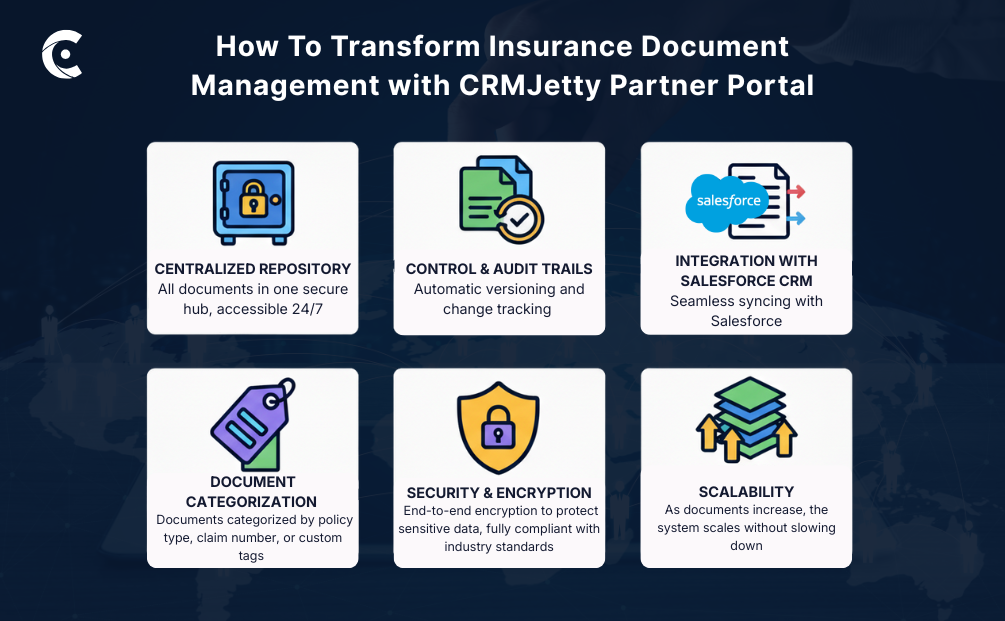
Unified Salesforce Access
CRMJetty does not store documents; the data is already stored in your CRM. The portal acts as a medium to display these files to authorized users, ensuring documentation stays connected to the correct policy, claim, or customer record.
Version Control and Audit Trails
CRMJetty displays the latest document versions available in Salesforce and reflects the existing version history and timestamps maintained within the CRM. This helps teams reference the most current file associated with each record—without duplicating documents or moving data outside Salesforce.
Integration with Salesforce CRM
Documents tied to policies, claims, and customer records do not need to be re-uploaded into separate systems. CRMJetty works with Salesforce CRM by displaying documents already attached to policies, claims, or customer records. Based on configured permissions, users can view, download, or upload files through portal pages, while all documents continue to be stored securely within Salesforce
Document Categorization and Metadata Tagging
CRMJetty leverages Salesforce record relationships and existing metadata to display documents in the right context, allowing users to locate files based on associated policy, claim, or customer records rather than relying solely on file names.
Security and Encryption
CRMJetty respects Salesforce’s existing security model. Documents remain encrypted within Salesforce, while the portal enforces role-based access, permissions, and controlled visibility—ensuring only authorized users can view or interact with sensitive files.
You may also wonder, “What happens when document volume doubles or triples? Can the system still keep everything fast and searchable?” Yes, because the problem with insurance is scalability. A properly structured Salesforce document setup allows teams to continue accessing records efficiently as volume grows. It scales the way insurance does: more policies, more claims, more records, same speed, same control.
If you’re ready to replace fragmented document handling with controlled document access through Salesforce, see how the solution works for your business!
How Insurance Teams Actually Use CRMJetty’s Salesforce Partner Portal for Insurance Document Management
Handling insurance documents isn’t just about storing files. Every policy document carries legal terms, customer expectations, renewal timelines, and compliance responsibilities — which is exactly why even one outdated or misplaced file can slow down an entire workflow.
When documents are scattered, even a simple task like sending a policy copy or preparing a renewal turns into unnecessary back-and-forth. These use cases highlight exactly where things go wrong and how CRMJetty partner portal’s insurance document management can step in before small mistakes turn into delays or compliance issues.
Use Case 1: Policy Document Management
Policy documents are already stored within Salesforce CRM. However, without controlled access and clear visibility, teams often struggle to use them efficiently across underwriting, renewals, and customer communication.
Problem
Insurance companies deal with proposals, terms, coverage details, endorsements, renewal papers, and more. When these files are handled manually or scattered across multiple storage tools, accuracy becomes hard to maintain. Here’s what can happen next:
- Agents and underwriters might end up working with outdated versions of policy documents without realizing it.
- Customers may receive incorrect policy details or missing clauses simply because the latest file wasn’t easy to locate.
- During renewals, document duplication or file loss can create compliance risks and delay the service timeline.
Solution with CRMJetty Partner Portal
CRMJetty’s partner portal provides centralized access to policy documents already stored in Salesforce, ensuring agents and underwriters always see the latest version linked to the correct policy record.
No one needs to search through folders or recall file names. Administrators, underwriters, and agents can easily search or filter documents by policy type, customer name, or policy number. Additionally, only authorized users are able to modify or update policy details because of the role-based access control. This control simply keeps accidental or unauthorized changes out of the workflow.
Impact
Here’s what CRMJetty’s partner portal can help insurance teams achieve:
✔ Reduce manual errors because outdated or duplicate files are no longer used.
✔ Eliminate confusion about document versions, since teams always reference the latest version available in Salesforce.
✔ Speed up the policy renewal process because files are accurate, organized, and instantly accessible.
✔ Enhance customer trust through faster, error-free service and transparent record handling.
Use Case 2: Claims Documentation Workflow
Claims-related documents are stored within Salesforce CRM, but delays often occur when customers and agents lack a structured way to submit, access, and track them during the claims process.
Problem
Claim processing comes with a long list of required documents. For instance, that includes forms, medical bills, photos, police reports, repair invoices, and other things that are required to verify the claim. In many insurance teams, these files are still collected through scattered emails, manual uploads, or even physical copies. This makes the entire workflow slow and prone to errors.
- Documents get lost or uploaded partially, which delays claim verification.
- Claim adjusters waste time asking customers to resend missing files instead of reviewing claims.
- Customers have no real-time visibility, so they call repeatedly just to check whether their documents were received or if the claim is actually moving forward.
Solution with CRMJetty Partner Portal
The portal can simplify claims documentation from the moment a claim is submitted. Customers can securely upload documents through portal forms, with files being stored directly in Salesforce and instantly linked to the correct claim record. This reduces reliance on email attachments by enabling documents to be uploaded directly into Salesforce through the portal.
The dashboard allows agents to quickly filter claim files by claim type, customer name, or claim status, speeding up the sorting and review. Nobody has to keep asking for status updates. With Salesforce notifications and workflows configured, users can be informed when document-related updates occur. Notifications can be triggered through Salesforce workflows when documents are uploaded, reviewed, or updated. Both customers and agents always know what happened and what needs to happen next.
Impact
Here’s what CRMJetty’s partner portal can help insurance teams achieve:
✔ Faster claim processing because documents are complete, organized, and accessible from one place.
✔ Fewer manual follow-ups and fewer communication gaps between agents and customers.
✔ Real-time transparency for customers, which increases satisfaction and reduces support calls.
✔ Agents will have more time to spend on complex claims rather than tracking down missing paperwork.
Use Case 3: Compliance Records Management
Compliance documents are maintained within Salesforce CRM, but without controlled access and clear activity tracking, preparing for audits can quickly become complex and time-consuming.
Problem
Compliance records in insurance serve as legal proof that policies, claims, and financial actions were handled correctly. It’s a core part of insurance document management. But when these records are scattered, even a routine audit becomes stressful and time-consuming!
A lot of insurance teams still spend weeks collecting documents manually just to prepare for compliance checks. In this process, missing timestamps or version history can result in audit failures or penalties. Sensitive information, including financial or health information about customers, may also be misused or exposed. And that can put the business at risk of violating regulations like GDPR, IRDAI, or HIPAA.
Solution with CRMJetty Partner Portal
The portal works as a secure access layer for Salesforce-stored compliance documents, reflecting the activity history already maintained within Salesforce without moving files outside the CRM.
Role-based access control, on the other hand, ensures that compliance-sensitive files can be viewed or modified only by authorized users. Salesforce version control preserves previous document states, which can be referenced through the portal. And that means older versions are never overwritten and can be retrieved instantly during an audit.
For global insurance teams, CRMJetty’s partner portal can also support multi-site and multi-language setups. That allows region-specific compliance documents stored in Salesforce to be accessed through localized portal interfaces. while still being managed under a single centralized system.
Impact
Here is what CRMJetty’s partner portal can help insurance teams achieve
✔ A clear, audit-ready view of document activity available within Salesforce
✔ Lower risk of regulatory violations and financial penalties
✔ Faster audit preparation because records are already organized and fully traceable
✔ Greater trust from regulators and customers through transparent data handling
When compliance documentation is managed correctly from the start, audits stop feeling like a scramble. Everything is already stored, searchable, and verifiable whenever it is needed.
Key Benefits of CRMJetty Salesforce Partner Portal’s Document Management
The Salesforce partner portal is not a document storage system or a standalone digital document management system. It enhances how insurance teams access, manage, and control Salesforce-stored documents across external and internal users. One that brings structure, traceability, and control into every document-driven process.
Here’s a list of all the core benefits insurance teams can experience:
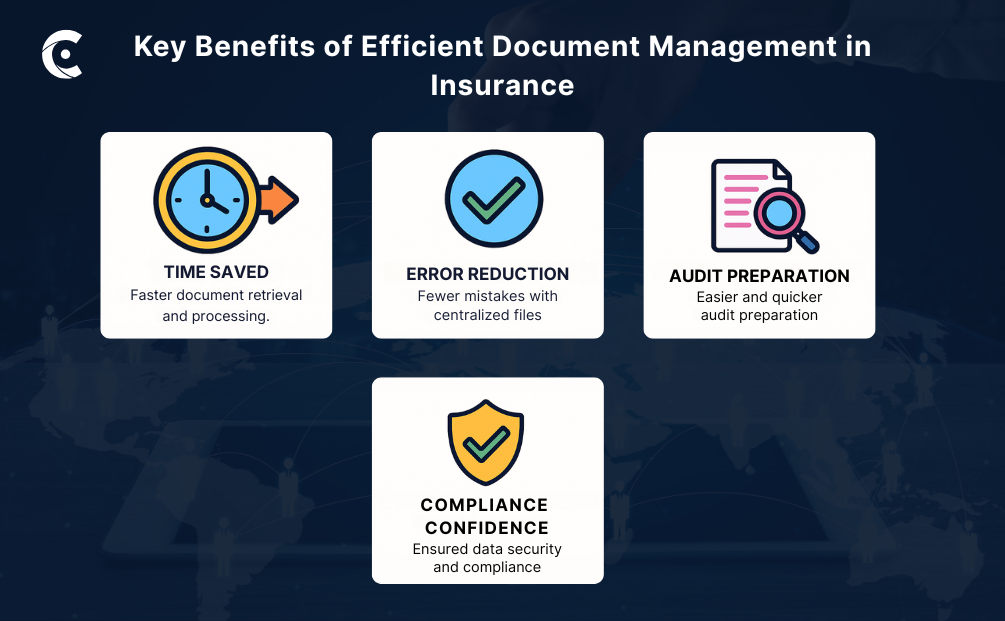
✔ All documents stay in one secure, centralized system, so nobody wastes time searching through drives or inboxes.
✔ Manual errors and duplicate versions drop significantly because every file lives inside a controlled insurance document management workflow.
✔ Salesforce workflows, combined with portal-based access, help reduce manual uploads and version confusion without extra back-and-forth.
✔ Teams can work together seamlessly because agents, customers, and back-office staff are always working on the same file, and more importantly, the correct one.
✔ Role-based access and Salesforce audit logs help protect sensitive documents.
✔ Consumers benefit from quicker responses, fewer hold-ups, and clearer updates, all of which enhance customer satisfaction and trust.
| Expert Tip: Insurance companies should monitor how documents are being accessed, processed, and managed over time. By using Salesforce reports to review document access patterns and workflow efficiency, approval workflows, and compliance audit outcomes, insurers can identify bottlenecks and inefficiencies. |
Final Thoughts
Insurance companies operate in an environment shaped by regulations, audits, customer expectations, and time-sensitive processes. In this setup, the challenge is not where documents are stored—but how securely and efficiently Salesforce-stored documents are accessed, shared, and managed across users.
CRMJetty’s Salesforce partner portal serves as a secure access layer, allowing authorized users to view, upload, and interact with documents stored in Salesforce. By keeping files connected to the correct policy, claim, or customer record, it reduces access gaps, version confusion, and manual follow-ups—without creating new storage systems or duplicating data.
When document-related delays or access issues slow down operations, the answer isn’t more manual work. It’s controlled document workflows that work seamlessly with Salesforce CRM and are designed for insurance teams.
See what happens when document management finally works the way it should.
All product and company names are trademarks™, registered® or copyright© trademarks of their respective holders. Use of them does not imply any affiliation with or endorsement by them.